
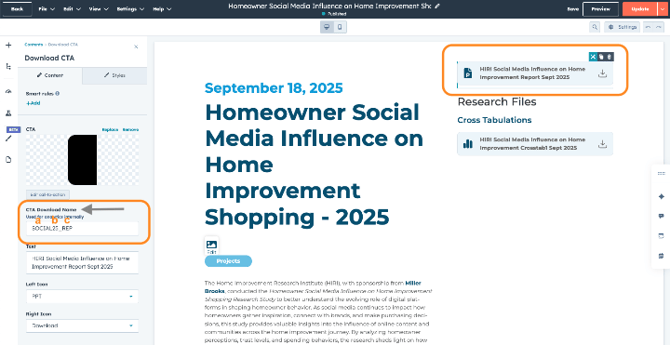
A. For SHORT “CTA Download Name” Field inside the individual element on website page
-
Base Convention Part A - Report Acronym
-
Base Convention Part B - Indicator of Publication Timeframe
-
For Ad Hoc, Bi-Annual, and Annual Studies – four digit year (ie 2025, 2026)
-
For Quarterly Studies – two digit year two digit quarter (ie 26Q1, 26Q2, 26Q3)
-
For Monthly Studies – two digit year two digit month (ie 2509 = September 2025)
-
For PPTS and PDS Studies - After the two digit year indicator, an abbreviation of the project or product category (ie PPTS24Ov, PPTS24Struc, PPTS24Ext) Base Convention Part B - Indicator of Publication Timeframe
-
-
Type - Whether the CTA is for a Report Download, Data File, or Tabulations File
-
-
MORE = (parent page) CTA to the child page for getting research files (ie, SOCIAL25_MORE)
-
-
-
REP = (child page and parent page) Report
-
(Same CTA used on child page and parent page)
-
-
-
-
DATA = Data File (child page)
-
-
-
TAB = Tabulations File (child page)
-
-
-
* if there are multiple DATA or TABs, add a number following
-
-
-
-
(ie DATA1, DATA2, DATA3)
-
-
*it is VERY important to NOT include the full length of the report name in part 1, for the CTA name, because that “CTA Download Name” is pulled into the contact record for reporting purposes and that field has a character limit that we need to be sensitive of
Example:
B. For LONG Internal CTA Name in HubSpot CTA Area for File Download CTAs
- Base Convention Part (A) - Report Acronym
- Base Convention Part (B) - Indicator of Publication Timeframe
- For Ad Hoc, Bi-Annual, and Annual Studies – four digit year (ie 2025, 2026)
- For Quarterly Studies – two digit year two digit quarter (ie 26Q1, 26Q2, 26Q3)
- For Monthly Studies – two digit year two digit month (ie 2509 = September 2025)
- For PPTS and PDS Studies - After the two digit year indicator, an abbreviation of the project or product category (ie PPTS24Ov, PPTS24Struc, PPTS24Ext)
- Type (C) - Whether the CTA is for a Report Download, Data File, or Tabulations File
- REP = (child page and parent page) Report
- Same CTA used on child page and parent page
- DATA = Data File (child page)
- TAB = Tabulations File (child page)
- * if there are multiple DATA or TABs, add a number following
- (ie DATA1, DATA2, DATA3)
- REP = (child page and parent page) Report
- Page Name (D) - A full written out name of the report file
- *it is VERY important to NOT include the full length of the report name in part 1, for the CTA name, because that “CTA Download Name” is pulled into the contact record for reporting purposes
- (E) Append “File Download” to the very end so that all of the CTAs that are related to File Downloads can be searched in the CTA area and for purposes of managing the data set
Example:
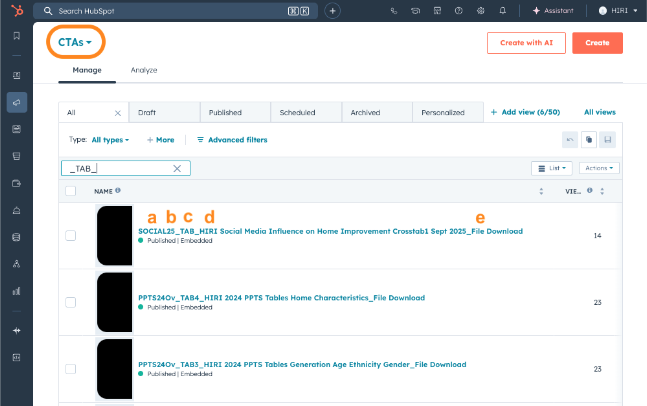
Examples of CTAs from migration:
|
|
|
|
|
|
|
|
|
|
|
|
|
|
|
|
|
|
|
|
|
|
|
|
|
|
|
|
|
|
|
|
|
|
|
|
|
|
|
|
|
|
|
|
|
|
|
|
|
|
|
|
|
|
|
|
|
|
|
|
|
|
|
|
|
|
|
|
|
|
|
|
|
|
|
|
|
|
|
|
|
|
|
|
|
|
|
|
|
|
|
|
|
|
|
|
|
|
|
|
|
|
|
|
|
|
|
|
|
|
|
|
|
|
|
|
|
|
|
|
|
|
|
|
|
|
|
|
|
|
|
|
|
|
|
|
|
|
|
|
|
|
|
|
|
|
|
|
|
|
|
|
|
|
|
|
|
|
|
|
|
|
|
|
|
|
|
|
|
|
|
|
|
|
|
|
|
|
|
|
|
|
|
|
|
|
|
|
|
|
|
|
|
|
|
|
|
|
|
|
|
|
|
|
|
|
|
|
|
|
|
|
|
|
|
|
|
|
|
|
|
|
|
|
|
|
|
|
|
|
|
|
|
|
|
|
|
|
|
|
|
|
|
|
|
|
|
|
|
|
|
|
|
|
|
|
|
|
|
|
|
|
|
|
|
|